 Morph
MorphMorph on iPhone Duo: a dream journal built for the fold
Dreams arrive at an awkward time. You are half awake, the room is dark and you have one hand free. Later, when you want to understand what you wrote, you want space to read. The iPhone Duo happens to fit both moments, and with Morph 2.0 our dream journal is made to use it properly.
What’s new in Morph 2.0 for iPhone Duo
When a new kind of screen appears, apps tend to fall into two groups. Some are updated to use the space. Others keep running as before, and the system shows them in a smaller window with empty bands around the edges. Earlier versions of Morph required full screen and portrait only, which meant the open Duo would have shown it letterboxed in the middle of the inner display.
If you are looking through iPhone Duo apps to see which ones have proper foldable iPhone app support, this is the difference to check for. Morph 2.0 drops that requirement. On the open iPhone Duo, Morph now fills the whole inner display, which is a wide landscape canvas of roughly 951 by 669 points. Nothing is stretched or scaled up. The layout itself adapts to the extra room.
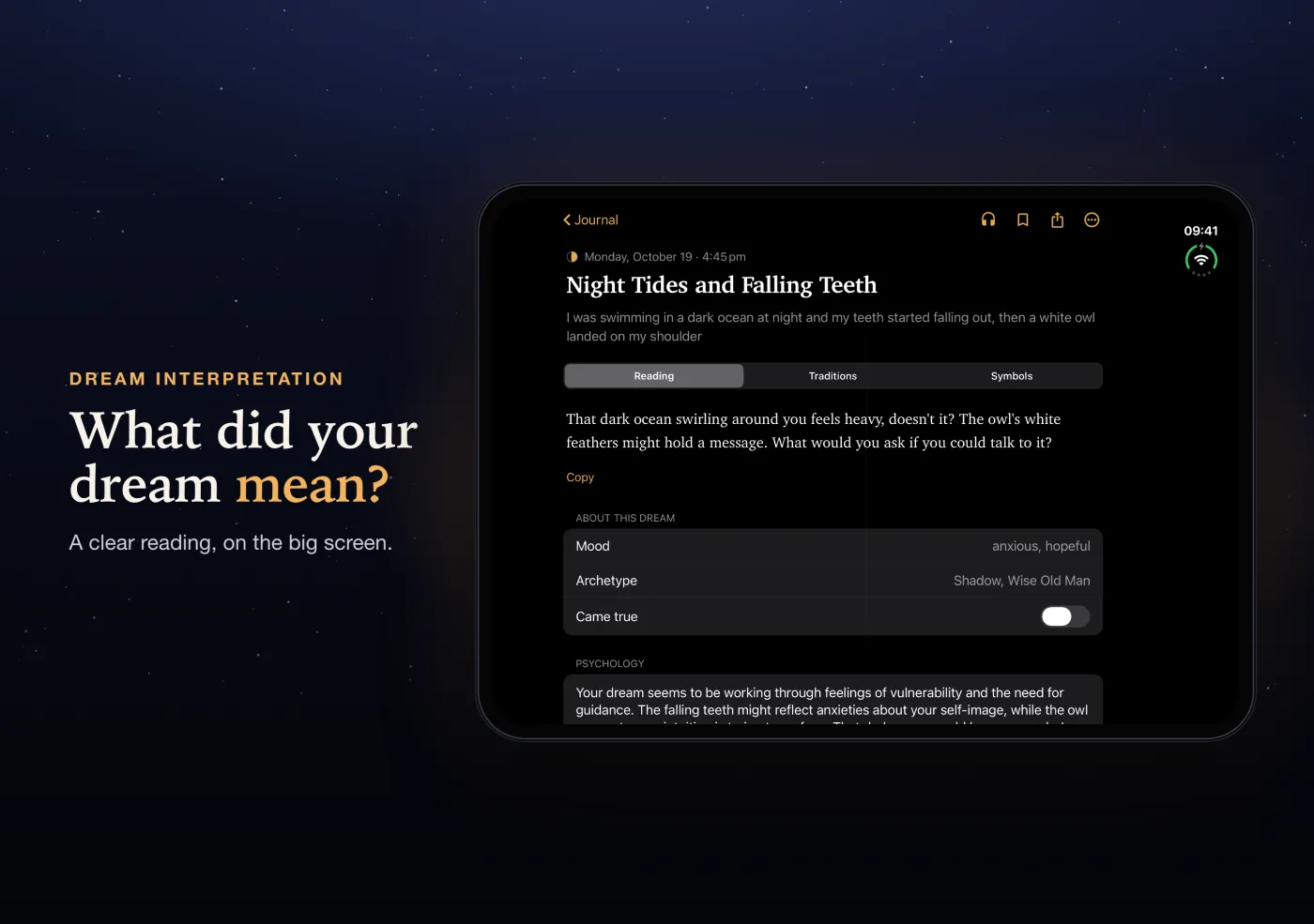
Folded and open: two ways to use one journal
Folded
On the outer display, Morph behaves exactly as it does on any other iPhone. It stays in portrait, the controls are where you expect them, and everything is reachable with one thumb. This is the mode for quick capture: open the app, type or speak the dream, and save it before it fades.
Open
Unfold the phone and Morph switches to the inner display. Here it rotates freely, so you can hold the Duo in landscape like a small book or turn it upright if that is more comfortable. On the open Duo the status bar sits along the right-hand edge, and Morph pads its content clear of that side area so nothing is tucked underneath it.
Switching between them
You can fold or unfold in the middle of anything. Morph keeps the same screen and simply resizes, without restarting or reloading. If you started describing a dream on the folded phone and open it to keep typing, your half-written entry is still there, cursor and all.
How Morph uses the bigger screen
A wider screen is not automatically better for reading. Lines of text that run edge to edge are tiring to follow, which matters when an interpretation runs to several paragraphs. So rather than spreading text across the full width, Morph places its content in a centred column of about 720 points. Long readings keep a comfortable line length, and the extra width becomes breathing room rather than clutter.
A few screens needed more specific work:
- The constellation, Morph’s map of your recurring symbols, was adjusted for the wider display so the map makes good use of the landscape canvas.
- Lucid dreaming training was adapted for the larger layout, and its badges were fixed so they fit cleanly. If you are new to it, our guide to lucid dreaming for beginners is a good place to start.
Everything else you use in Morph is available on the open display too: writing or speaking a dream, reading it through five traditions (Jungian, Islamic in the tradition of Ibn Sirin, Taoist, Vedic and Japanese), the Prism view that sets those readings side by side, symbol pages, and your mood and insights over time.
A short morning workflow
Here is how we have found the Duo works best for a dream journal in practice.
- On waking, keep it folded. Reach for the phone, open Morph and get the dream down in rough form. Speaking is often quickest when you are still drowsy. Do not worry about tidy sentences. Our guide on how to remember your dreams explains why speed matters here.
- Add the feeling. One word is enough: anxious, relieved, curious. The mood is often the most useful part of an entry later on.
- Unfold to read. Once you are up, with a coffee or still in bed, open the phone and read the interpretation on the inner display. Long readings are far easier to take in at this size.
- Compare traditions. Use the Prism to see how the five traditions read the same dream. Where they agree, it may be worth paying attention. Where they differ, the contrast is often what makes you think.
- Look for patterns. Every so often, open the constellation or your insights to see which symbols keep returning. Our guide to keeping a dream journal has more on building the habit.
None of this needs the Duo, of course. Morph works the same way on any iPhone. The fold just makes the two halves of the routine, quick capture and slow reading, feel natural on one device.
Why this matters for a dream journal app
Most of the work in a dream journal happens in two places: a few seconds of capture before the memory goes, and a few minutes of reflection afterwards. A phone suits the first and a larger screen suits the second. Reading in bed on the open Duo, without squinting at a narrow column or letterboxed window, is a small thing, but small things decide whether a habit sticks. That is why we think an iPhone Duo dream journal belongs on any list of the best apps for iPhone Duo, whichever one you choose. If you are comparing options, our round-up of the best dream journal apps covers what to look for more broadly.
Frequently asked questions
Does Morph work on iPhone Duo?
Yes. With Morph 2.0, Morph runs as a normal portrait app on the folded iPhone Duo and full screen on the open inner display, in landscape or portrait.
Does Morph run full screen on the open iPhone Duo?
Yes. Morph 2.0 fills the whole inner display instead of sitting in a small centred window. Text stays in a readable centred column so long interpretations are comfortable to read.
Will I lose my dream if I fold or unfold the phone?
No. Morph resizes in place when you fold or unfold the iPhone Duo. It does not restart, and whatever you were writing stays where it was.
Does Morph work on iPad too?
Yes, Morph runs on iPad as well, and the same large-screen layout work applies there. You can also use Morph in any web browser at app.getmorph.app.
Morph interpretations are for reflection and entertainment, not medical, psychological or religious advice. If nightmares or poor sleep are affecting your daily life, please talk to a doctor or a qualified professional.
Try Morph on your iPhone Duo
Morph is free to start on iPhone and the web. Describe your dream and read it through five traditions side by side: Jung, Ibn Sirin, Taoist, Vedic and Japanese Hatsuyume. Get Morph on the App Store, or start here in your browser.
